Alumnihubble user guide One alumni identity. Every alma mater. A trusted community for reconnecting, career growth, celebrations and giving back.
SG PR INFOTECH LLP · Illustrated application guide · Demo examples are fictional
Getting started Role journeys All modules Payments & trust Using the demo 01 · From first visit to verified community Create account Use email or Google. Confirm your email for account access.
Choose institution Find your alma mater and send a membership request.
Get verified An authorized admin reviews institution details and proof.
Reconnect Complete your profile, invite friends and join eligible activities.
Email confirmation is not alumni verification. A friend invitation never grants membership or administrator access.
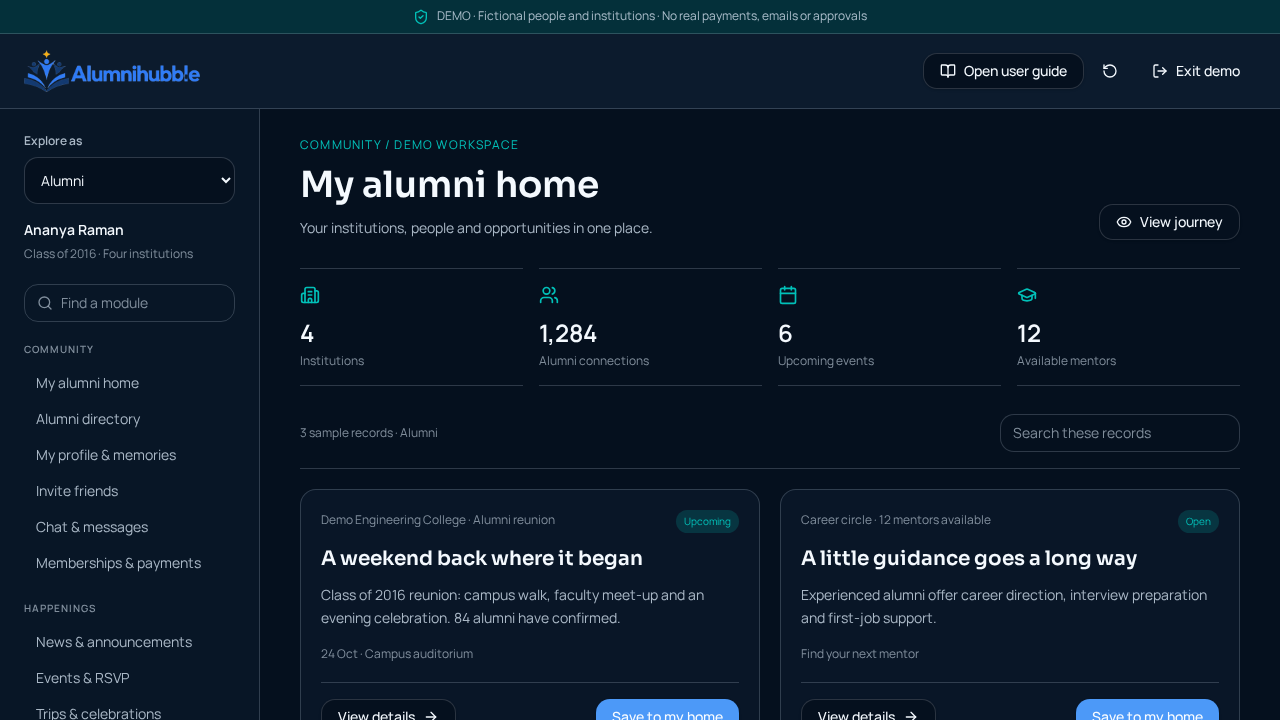
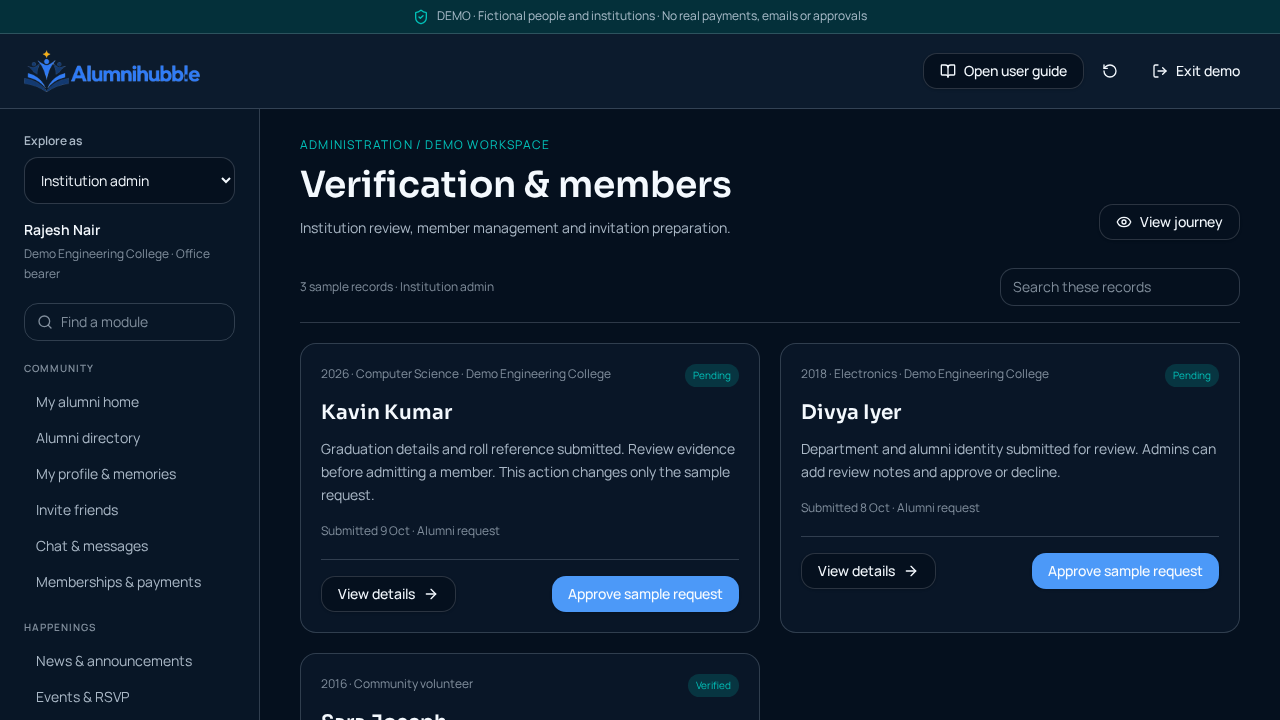
02 · Your journey by role Alumni: join, verify, reconnect 1 Create your free account and confirm your email.2 Find each institution and submit your education details.3 Wait for an authorized institution admin to verify membership.4 Complete your profile, discover alumni, invite friends and join activities.Illustrated demo screen: alumni home and module navigation. Explore this journey Mentors and mentees: turn guidance into progress 1 Become a verified member of the relevant institution.2 Mentors publish experience, expertise and availability; mentees browse and request guidance.3 The mentor accepts a request and the shared workspace opens.4 Schedule sessions, set goals and track milestones with notes and chat.Explore this journey Institution admins: build a trusted community 1 Submit office-bearer proof through the institution claim journey.2 A platform steward reviews authority before granting institution control.3 Review alumni requests and manage members, content, events, polls and galleries.4 Choose the annual payer and request institution-specific terms; keep the ₹1,000 security deposit separate.Illustrated demo screen: reviewing alumni requests within an institution. Explore this journey Chain admins: oversee only your campuses 1 Receive a legitimate chain appointment from a platform steward.2 Review the campuses and administrators assigned to your chain.3 Coordinate institution activity and delegate authorized responsibilities.4 Respect each alumni audience: management authority alone is not voting eligibility.Explore this journey Platform stewards: authorize, do not bypass 1 Use your authorized platform account, not a demo persona.2 Review institution authorisation claims and supporting proof.3 Appoint chain admins, review providers and curate institution records.4 Review private billing offers; paid status requires captured-payment reconciliation.Explore this journey Service providers: enquiry to booking 1 Submit a provider application or follow an authorized provider invitation.2 Complete review before appearing in the marketplace.3 Respond to alumni requirements with itemized quotations.4 Track an awarded booking; commissions, payouts and refunds require the supported settlement process.Explore this journey 03 · Every module, step by step Community My alumni home Create an account and confirm your email. Find each institution and request membership. An authorized admin reviews your request before verified access. Open sample module Alumni directory Open Directory after verification. Filter by institution, batch or professional interests. Open an alumni profile and start a conversation. Open sample module My profile & memories Add education for each institution. Complete experience, skills and your profile. Post an update or submit memories for gallery moderation. Open sample module Invite friends Select Invite friends on your home page. Choose an institution and share its public link. Your friend signs up, confirms email and requests verification. Open sample module Chat & messages Open alumni chat for your institution. Choose a person or create a group conversation. Use Messages for private institution-admin threads. Open sample module Memberships & payments Open My memberships & payments. Check who pays for each institution and its agreed annual terms. Payment is paid only after provider reconciliation; a security deposit is separate. Open sample module Happenings News & announcements Open News and choose an institution. Read published stories and announcements. Admins draft and publish institution content. Open sample module Events & RSVP Open an event and review date, venue and details. RSVP; capacity may place you on a waiting list. Return to see attendance and event updates. Open sample module Trips & celebrations Propose a trip or celebration for institution review. Vote on dates and enroll once approved. Review itinerary, budget, arrangements, expenses and photos. Open sample module Polls & Arena Admins choose institution, chain, batch, department or group audience. Eligible alumni cast one vote in that audience. View published results and participate in permitted comments. Open sample module Career Career hub Complete work experience and skills on your profile. Browse published jobs and internships. Review the opportunity and contact or apply as directed. Open sample module Mentor–Mentee Mentors publish experience, expertise and availability. Mentees request same-institution guidance; mentors accept or decline. Schedule sessions, record goals, milestones and progress in the workspace. Open sample module Support Giving & philanthropy Open an institution’s published campaign. Review purpose, funding target and donation amount. Complete supported checkout; recorded payment requires verification. Open sample module Event & travel services Browse approved providers or submit a service request. Compare quotations for venue, food, tours, gifts or event management. Award a quotation and track the booking; provider settlement is separate. Open sample module Smart classes & IT Open Smart classes & IT and review setup options. Describe your institution, classroom or lab requirements. Submit an enquiry; live delivery depends on the configured email service. Open sample module Shop Shop, store & orders Choose merchandise, size and quantity. Review the bag, delivery details and authoritative checkout amount. Track reconciled payment and fulfilment in My orders. Open sample module Administration Verification & members Review alumni education and submitted supporting details. Approve or decline within your institution’s authority. Manage active members, blocks and admin messages; link preparation is not email delivery. Open sample module Institution billing An authorized admin requests the ₹1,000 security deposit separately from annual dues. Select admin payment/internal collection or direct alumni payment. Request tailored terms; an offer is not paid access until verified checkout. Open sample module Chain administration A platform steward appoints a chain super admin. Review only campuses and admins in that chain. Manage delegated authority and institution-scoped activity without bypassing alumni audiences. Open sample module Platform stewardship Review office-bearer proof before granting institution control. Appoint scoped chain administrators and review providers. Review private billing requests without treating offers as payments. Open sample module 04 · Payments and trust, without confusion One identity One account can belong to several institutions. Verification is institution-specific; paying does not verify identity.
Admin chooses the payer Annual terms are institution-specific: admin pays (collects internally), or alumni pay directly. Multiple memberships do not imply one universal payment.
₹1,000 security deposit The institution security deposit is separate from annual charges. It is not annual-plan credit. Refund or adjustment terms are not assumed.
Demo receipts, prices, paid-through dates and offers are illustrative. Real annual dues require agreed institution contracts; captured payments must be reconciled before balances or paid access change. Live collection and email delivery depend on provider and domain setup. Copying an invitation link is not sending an email.
05 · Presenting the demo Open the demo without signing in; choose a persona using Explore as. Browse any module. Administration previews require an admin demo persona for simulated actions. Open record details and try voting, RSVP, mentorship, quotation, checkout or verification simulations. Switch roles to see a different perspective. Reset demo clears only sample activity. Exit demo returns to the live app. Real sign-in, permissions and verification remain unchanged. Demo activity lasts in this browser tab; it is not synchronized across users. No real messages, email, payment or role grants occur. Screenshots show fictional demo records, not production data.
Alumnihubble · SG PR INFOTECH LLP